
If you have received your Ramadan Nigehban Card 2026 from the Punjab Government, the most critical step to access your Rs. 10,000 financial assistance is generating your Personal Identification Number PIN for Ramadan Nigehban Card. Without an active PIN, you cannot withdraw cash from ATMs or complete transactions at authorized merchants . This comprehensive guide provides the complete, updated, and easy process to set your PIN securely using two official methods: the Bank of Punjab (BOP) WhatsApp service and authorized biometric agents. Follow these steps carefully to activate your card and receive your Rs. 10,000 without any delay or confusion.
Why PIN Generation Is Essential
Your PIN for Ramadan Nigehban Card protects your card and ensures that only you can access the funds. Without setting a PIN:
- You cannot withdraw cash from any ATM
- You cannot complete secure transactions at merchant shops
- Your card remains inactive and unusable
- You risk delays in receiving your Rs. 10,000 relief
Always keep your PIN confidential and never share it with anyone, including agents or family members.
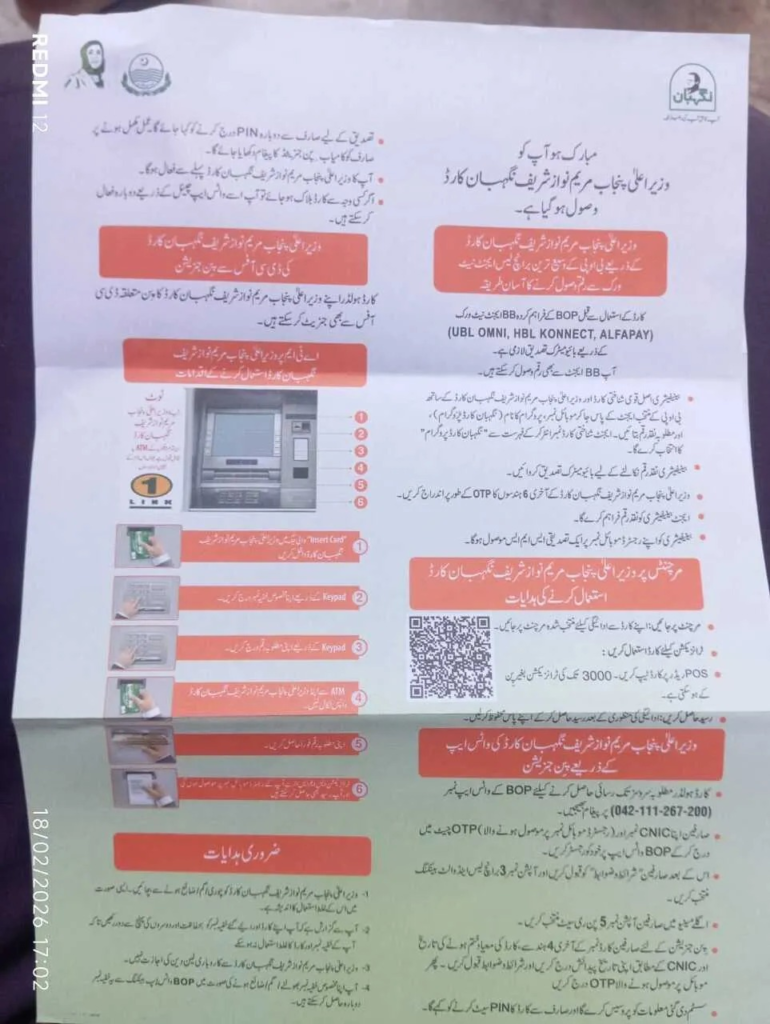
Method 1: Generate PIN Through BOP WhatsApp (Official & Easiest Method)
This is the most convenient and recommended method to generate your PIN for Ramadan Nigehban Card from home without visiting any center.
Step-by-Step Process:
- Save the official Bank of Punjab WhatsApp number: 042-111-267-200 in your mobile contacts .
- Open WhatsApp and send a message to this number from your registered mobile number.
- Type your 13-digit CNIC number without dashes and send it.
- Read and accept the terms and conditions displayed on the screen.
- Select the option related to “Nigehban Card Banking” from the menu.
- Choose the “PIN Set” or “Generate PIN” option.
- Enter the required details accurately:
- Last 4 digits of your Nigehban Card
- Card expiry date (printed on the front of your card)
- Your full 13-digit CNIC number
- You will receive an OTP (One-Time Password) on your registered mobile number. Enter this OTP in the WhatsApp chat.
- Create a new 4-digit PIN of your choice.
- Confirm the PIN by entering it again.
- Wait for the confirmation message. You will receive a notification once your PIN is successfully generated .
Note: Your SIM must be registered in your own CNIC name to receive the OTP.
Method 2: Generate PIN via Authorized BOP Agent
If you face any issues with the WhatsApp method or prefer in-person assistance, you can visit authorized biometric agents.
Where to Visit:
- Bank of Punjab (BOP) branches
- UBL Omni agents
- HBL Konnect agents
- Alfa Pay agents
- Designated activation centers (136 centers established across Punjab)
Required Documents:
| Document | Purpose |
| Original CNIC | Identity verification |
| Nigehban Card | Card validation and activation |
| Registered Mobile Number | OTP confirmation and future transactions |
The agent will complete biometric verification using your thumb impression and help you set your PIN securely. This process ensures that only the real beneficiary accesses the funds and prevents fraud .
PIN Generation Methods Comparison
| Method | Steps | Processing Time |
| BOP WhatsApp | Save number → Send CNIC → Select PIN Set → Enter details → Enter OTP → Create PIN | Instant |
| Authorized Agent | Visit agent → Provide CNIC & Card → Biometric verification → Set PIN | 5-10 minutes |
| BOP Branch | Visit branch → Fill form → Verification → Set PIN | 10-15 minutes |
| Activation Center | Visit center → Provide documents → Biometric → Set PIN | 5-10 minutes |
How to Withdraw Rs. 10,000 After PIN Generation
Once your PIN for Ramadan Nigehban Card is active, you can withdraw your money using multiple channels.
ATM Withdrawal Steps:
- Insert your Nigehban Card into any ATM displaying the 1-Link logo (HBL, UBL, Meezan Bank, etc.) .
- Select your preferred language.
- Enter your 4-digit PIN when prompted.
- Choose “Cash Withdrawal” and select account type (if asked).
- Enter the amount (you can withdraw full Rs. 10,000 at once or in installments).
- Collect your cash and take the receipt.
- Do not forget to remove your card.
Branchless Banking Agent Withdrawal:
- Visit any authorized Bank of Punjab branchless banking agent.
- Provide your Nigehban Card and original CNIC.
- Complete biometric verification through thumb impression.
- The agent will process the withdrawal and hand over your cash.
- Collect your receipt for record.
Using the PIN for Ramadan Nigehban Card at Merchant Shops
You can also use your card at selected grocery stores and merchants linked with the program.
- Swipe the card on the POS machine at the shop.
- Enter your 4-digit PIN for transactions above Rs. 3,000.
- For smaller amounts, PIN may not be required.
- Always collect the receipt after every transaction.
- Do not transfer funds to other accounts or individuals .
Biometric Verification Requirement
Before your first withdrawal, biometric verification is mandatory through authorized agents. This important step ensures:
- Only the genuine beneficiary uses the card
- Prevention of fraud and unauthorized access
- Secure and transparent fund distribution
- Compliance with government safety protocols
Common Problems and Quick Solutions
| Problem | Solution |
| OTP not received | Check if your SIM is registered in your own CNIC; ensure network signal is strong |
| Biometric verification failed | Visit another authorized agent; ensure your thumbs are clean and dry |
| PIN not accepted | Reset your PIN via BOP WhatsApp or visit nearest BOP branch |
| Card blocked | Contact BOP helpline immediately or visit nearest activation center |
| Card not delivered | Check eligibility by sending CNIC to 8070; visit local Union Council office |
Conclusion
Generating your PIN for the Ramadan Nigehban Card is a simple but essential step to access your Rs. 10,000 financial assistance. Whether you choose the convenient BOP WhatsApp method or prefer visiting an authorized agent, the process is designed to be quick, secure, and user-friendly . Remember to keep your PIN confidential, complete biometric verification, and use only official channels for withdrawals. This financial support from the Punjab Government is meant to help deserving families observe Ramadan with dignity and peace. Activate your card today and receive your Rs. 10,000 without delay.
Official Portal: https://pser.punjab.gov.pk/
Official SMS Code: 8070
Official Helpline: 0800-02345
Latest Updates
 Ramzan Cards Apply Online Eligibility & Registration Complete Guide 2026
 Big Update 2026! CM Punjab Laptop Scheme Deadline Extended – Apply Now
 CM Maryam Nawaz Rashan Card: Get 10,000 Rupees and Monthly Subsidy
 Breaking News! 8070 Web Portal Registration Punjab 2026
 Breaking News: CM Punjab 10000 Ramzan Package 2026 – Complete Registration, Eligibility & Payment Guide
 Breaking News 2026: Nigehban Card Payment Released / How to Check CNIC & Withdraw 10,000 Now